Raspberry Pi vs Arduino for robotics automation: Arduino is a microcontroller built for real-time hardware control motors, sensors, precise timing. Raspberry Pi is a full computer built for intelligence vision, AI processing, and connectivity. Most production-grade automation systems in 2026 use both together rather than choosing one.
If you’re evaluating boards for a robotics or automation project, that’s the short answer. Here’s the longer one and why it matters more than ever right now.
Raspberry Pi vs Arduino 2026: Why This Comparison Matters Right Now
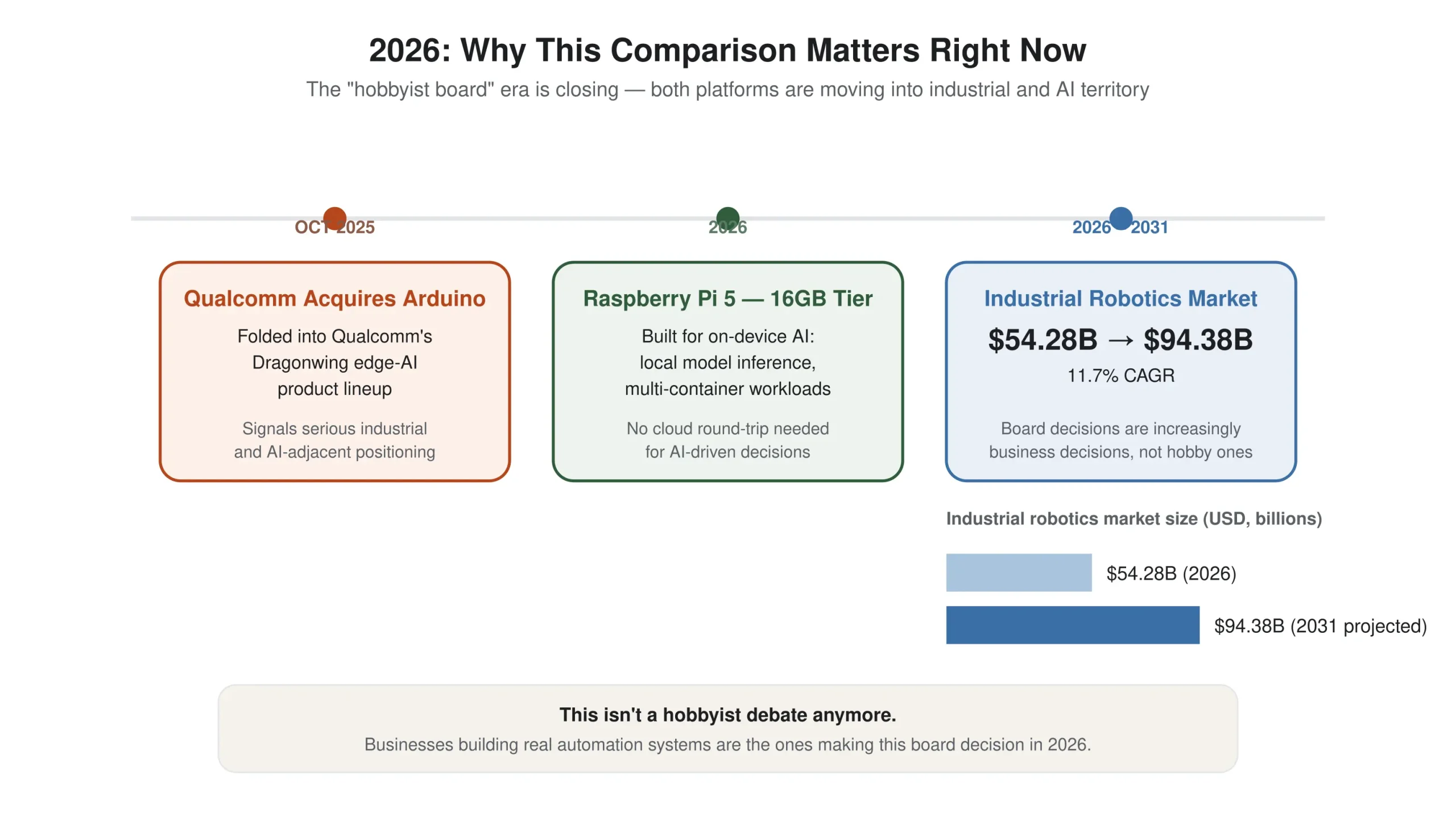
This isn’t the same debate it was five years ago. In October 2025, Qualcomm announced its acquisition of Arduino, folding the Italian microcontroller company into its Dragonwing edge-AI ecosystem a clear signal that Arduino is being positioned for serious industrial and AI-adjacent applications, not just hobbyist projects.
Around the same time, Raspberry Pi pushed its flagship Pi 5 into a new memory tier, topped by a 16GB model built for running local AI models and multi-container workloads on-device.
In other words: the “toy board” era for both platforms is closing. Any Raspberry Pi vs Arduino 2026 comparison has to account for the fact that both boards are now competing and increasingly cooperating for the same territory: on-device AI, industrial IoT, and robotics at scale.
If you’re making a board decision for a business-critical automation project in 2026, you’re making it in a genuinely different landscape than a beginner tutorial from a few years back would suggest.
This isn’t a hobbyist debate anymore. The industrial robotics market is valued at roughly $54.28 billion in 2026 and is projected to reach $94.38 billion by 2031, growing at an 11.7% CAGR which means board-level decisions like this one are increasingly being made by businesses building real automation systems, not just makers in a garage.
What Arduino Actually Does Best: Real-Time Control
Arduino is a microcontroller, not a computer. It runs one program at a time, has no operating system, and executes with predictable, deterministic timing. That distinction matters enormously in robotics.
Picture a robot with a PID motor control loop the kind of feedback system that keeps a wheel spinning at a precise speed or a servo holding a precise angle.
Run that loop on a device with an operating system, and the OS scheduler will interrupt it at unpredictable intervals. The result is oscillation, jitter, and a robot that visibly stutters. Run it on Arduino, and it executes cleanly, every cycle, on schedule.
That’s why Arduino remains the default choice for:
- Motor control and PWM signal generation
- Reading sensor and encoder data at high frequency
- Any task where microsecond-level timing is non-negotiable
- Low-power, always-on hardware interfaces
It’s also the cheaper option per unit typically in the $10–30 range depending on the model which matters a great deal once you’re deploying dozens or hundreds of automation nodes rather than a single prototype.
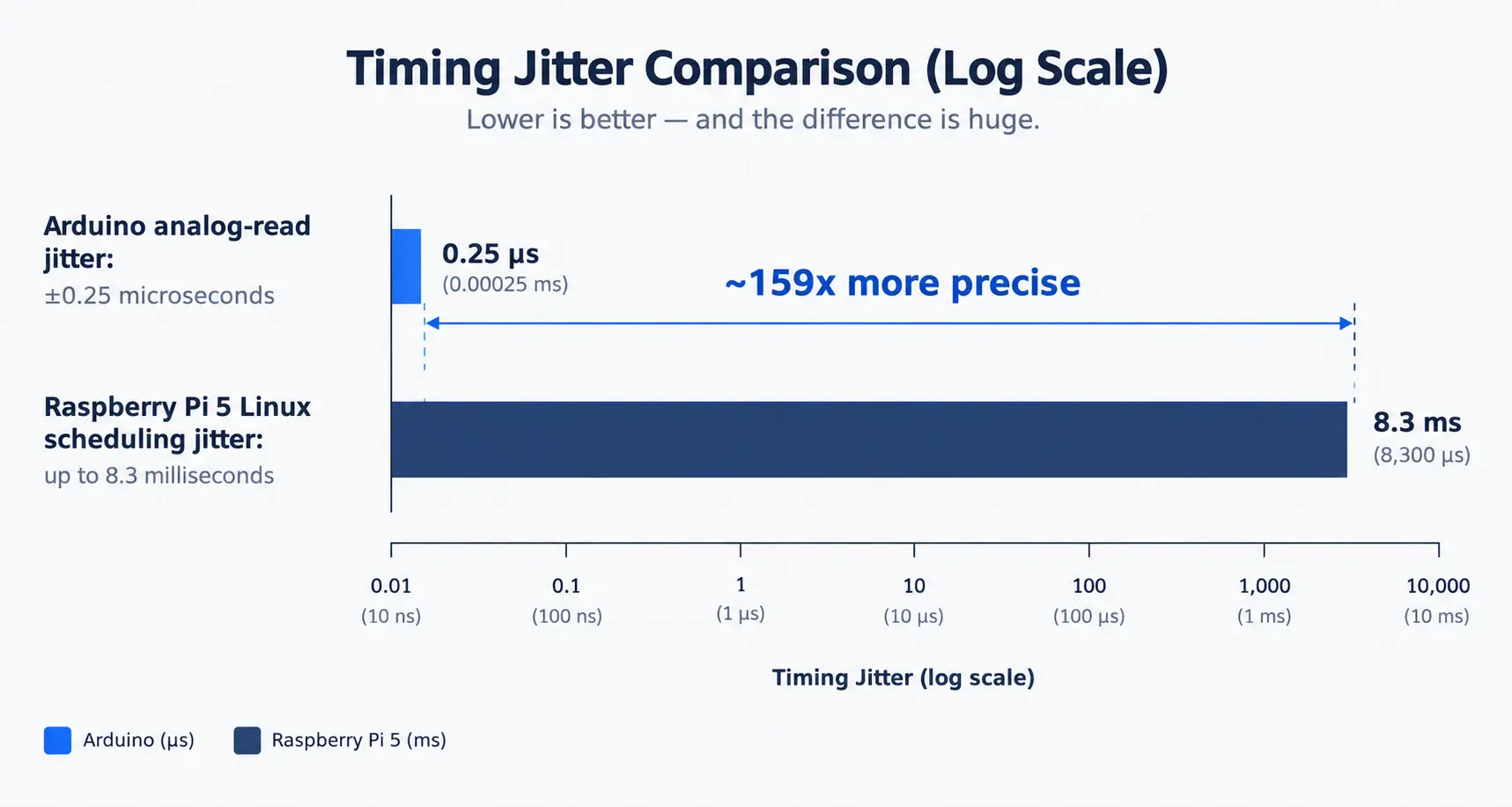
To put that precision in perspective: Arduino can read an analog sensor with jitter as low as ±0.25 microseconds. A Raspberry Pi 5 running Linux, by comparison, has scheduling jitter of up to 8.3 milliseconds meaning Arduino is roughly 159 times more precise for real-time tasks like this. That gap is exactly why motor control and sensor timing stay on Arduino, even in systems where Raspberry Pi handles everything else.
Getting this right also depends on good sensor integration choosing the right sensor types, positioning them correctly, and calibrating them for the operating environment.
Even a well-chosen board can underperform if the sensors feeding it are noisy, poorly placed, or miscalibrated, so it’s worth planning for early rather than treating as an afterthought once the board decision is made.
What Raspberry Pi Actually Does Best: Intelligence and Connectivity
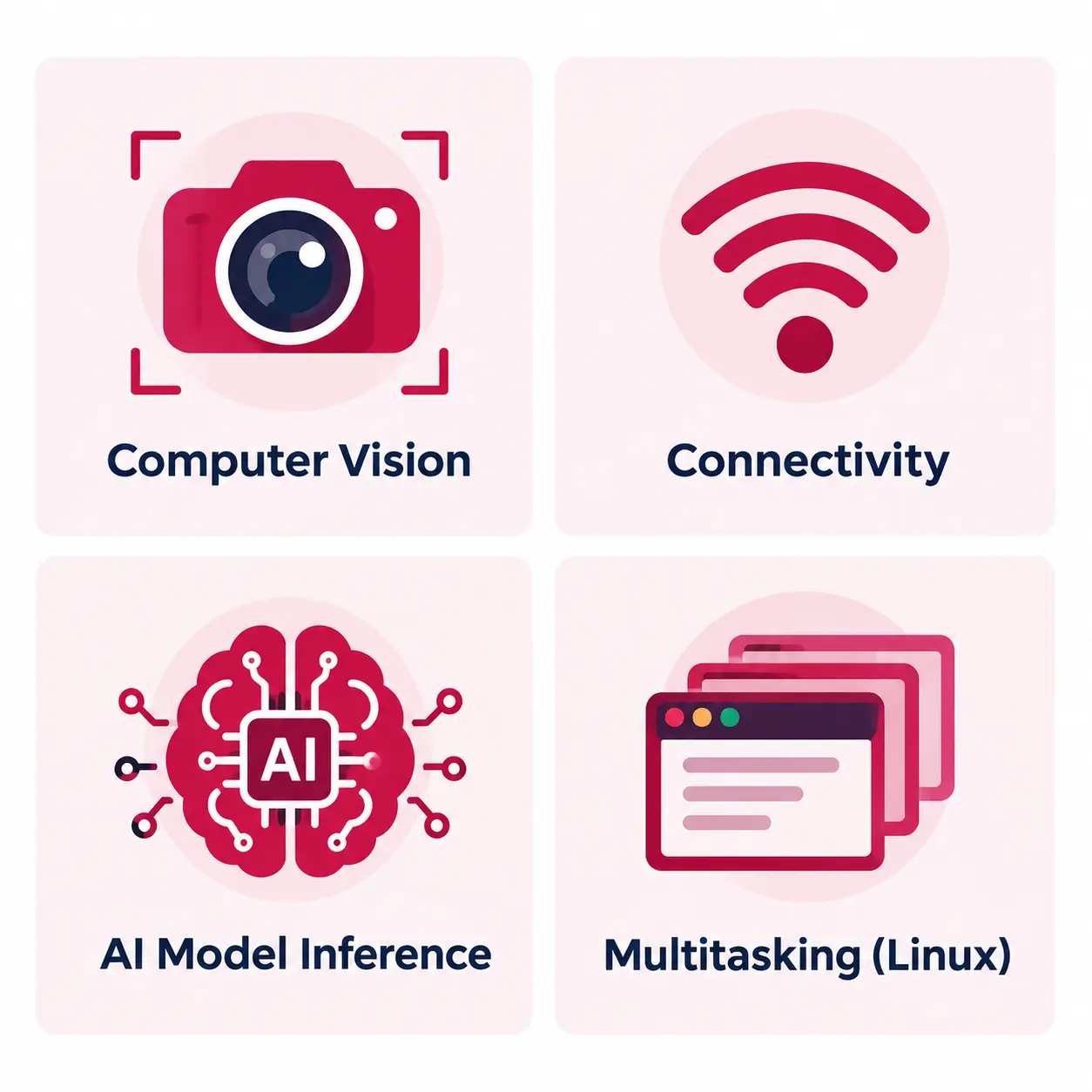
Raspberry Pi is a full Linux computer. It can multitask, connect to networks, run modern software stacks, and process the kind of workloads that would be impossible on a microcontroller computer vision, path planning, machine learning inference, ROS (Robot Operating System) integration.
Where Arduino gives you precise, reliable execution, Raspberry Pi gives you processing power and flexibility. It’s the natural choice when a robot or automation system needs to:
- Interpret a camera feed and make decisions from it
- Run AI models for object detection, defect inspection, or predictive analysis
- Communicate over Wi-Fi, Bluetooth, or a broader network
- Handle complex logic that a microcontroller’s limited memory simply can’t support
The trade-off is timing predictability. A Raspberry Pi running Linux is not built for hard real-time control, and trying to force it into that role say, driving a motor loop directly from Python is a common beginner mistake that produces exactly the kind of instability Arduino avoids by design.
This is also where edge AI development comes in: running AI models directly on the device rather than sending data to the cloud for processing.
Raspberry Pi’s higher-memory models are increasingly built for exactly this local object detection and on-device inference but doing it well takes real expertise in optimizing models to fit a device’s memory and processing constraints.
Arduino vs Raspberry Pi Robot: Quick Comparison
| Arduino | Raspberry Pi | |
| Type | Microcontroller | Single-board computer |
| Operating System | None (bare metal) | Linux |
| Real-time control | Excellent | Poor (OS scheduling interference) |
| Processing power | Low | High |
| Typical cost per unit | ~$10–30 | ~$35–75+ (more for higher-memory models) |
| Best for | Motor control, sensors, timing-critical tasks | Vision, AI, networking, complex logic |
| Boot time | Instant | Seconds (full OS boot) |
| Power draw | Very low | Higher |
For anyone running a more formal industrial automation board comparison, this table is the starting point: Arduino wins on determinism and cost per node, Raspberry Pi wins on compute and connectivity. Neither column is the “correct” answer on its own the right build almost always draws from both.
What This Actually Costs: Board Price vs. Total Cost of Deployment
The board’s price tag is the smallest part of what a robotics automation system actually costs. Arduino boards typically run $10–35 per unit, Raspberry Pi boards $35–95 — but total cost of ownership includes far more than that sticker price, and it changes depending on how the system is used.
Three things drive the real number:
- Cost at volume — a $25 price gap per unit is trivial for one prototype, but multiplies fast: at 500 units, that’s a $12,500 difference before any other cost is considered.
- Engineering and integration time — using the wrong board for the job often costs more than the board itself.Forcing Arduino to handle a task that needs real computing power can demand significantly more development time than the hardware savings are worth and the reverse is just as wasteful: deploying a full Raspberry Pi to do a job Arduino could handle for under $10 can mean paying $60–100 extra for capability that never gets used.
- Ongoing maintenance — Arduino firmware updates typically require a physical connection, while Raspberry Pi supports remote updates and patching. At scale, that difference in maintenance overhead adds up over the system’s lifetime, not just at launch.
This is exactly why board selection isn’t really a $10-vs-$35 decision it’s a total-cost decision that depends on matching the right board to the right part of the job, and getting the integration right the first time.
Getting this calculation wrong is one of the most common and expensive mistakes businesses make when building an automation system without experienced guidance.
Why Serious Automation Systems Use Both, Not Either
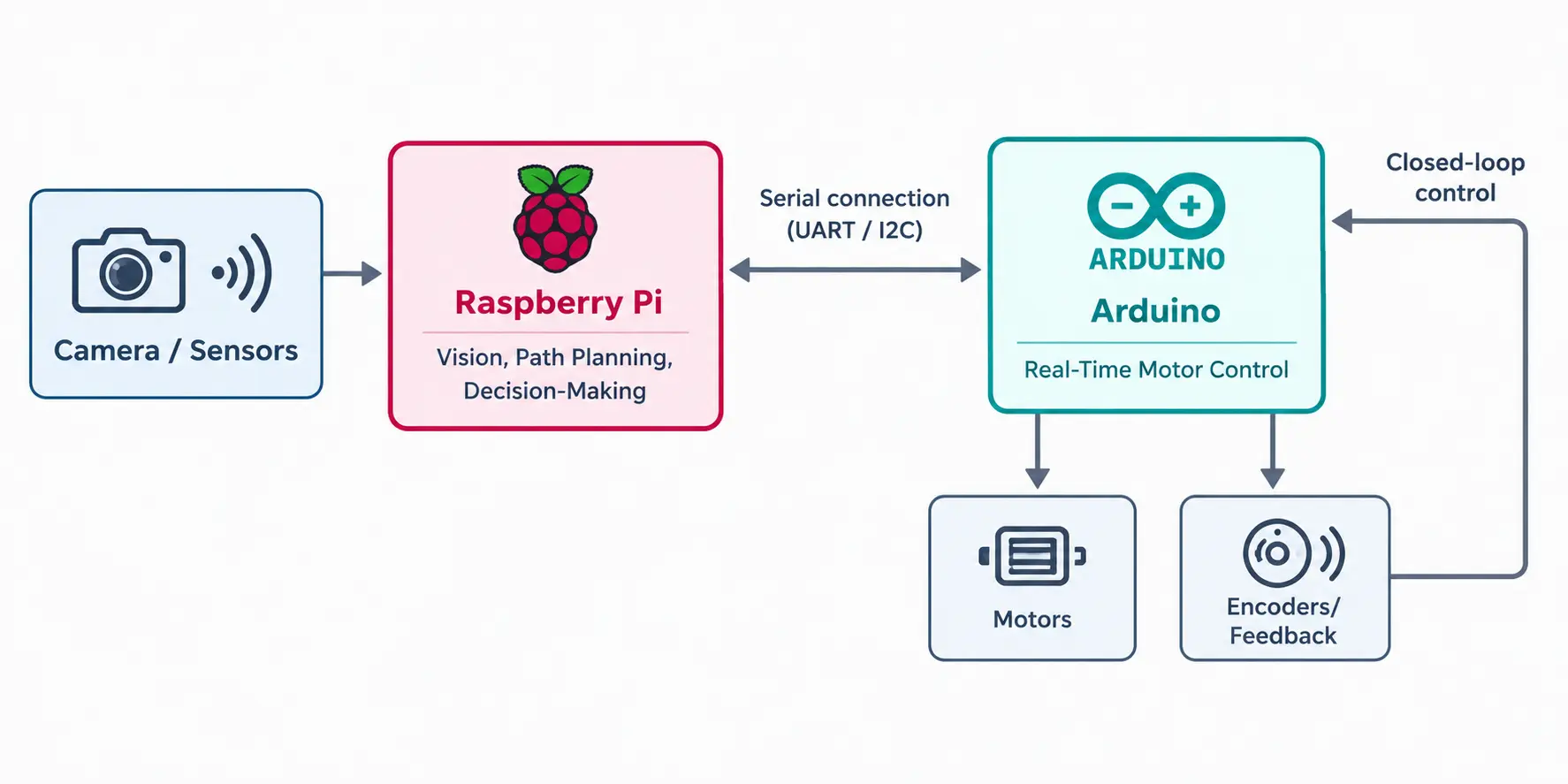
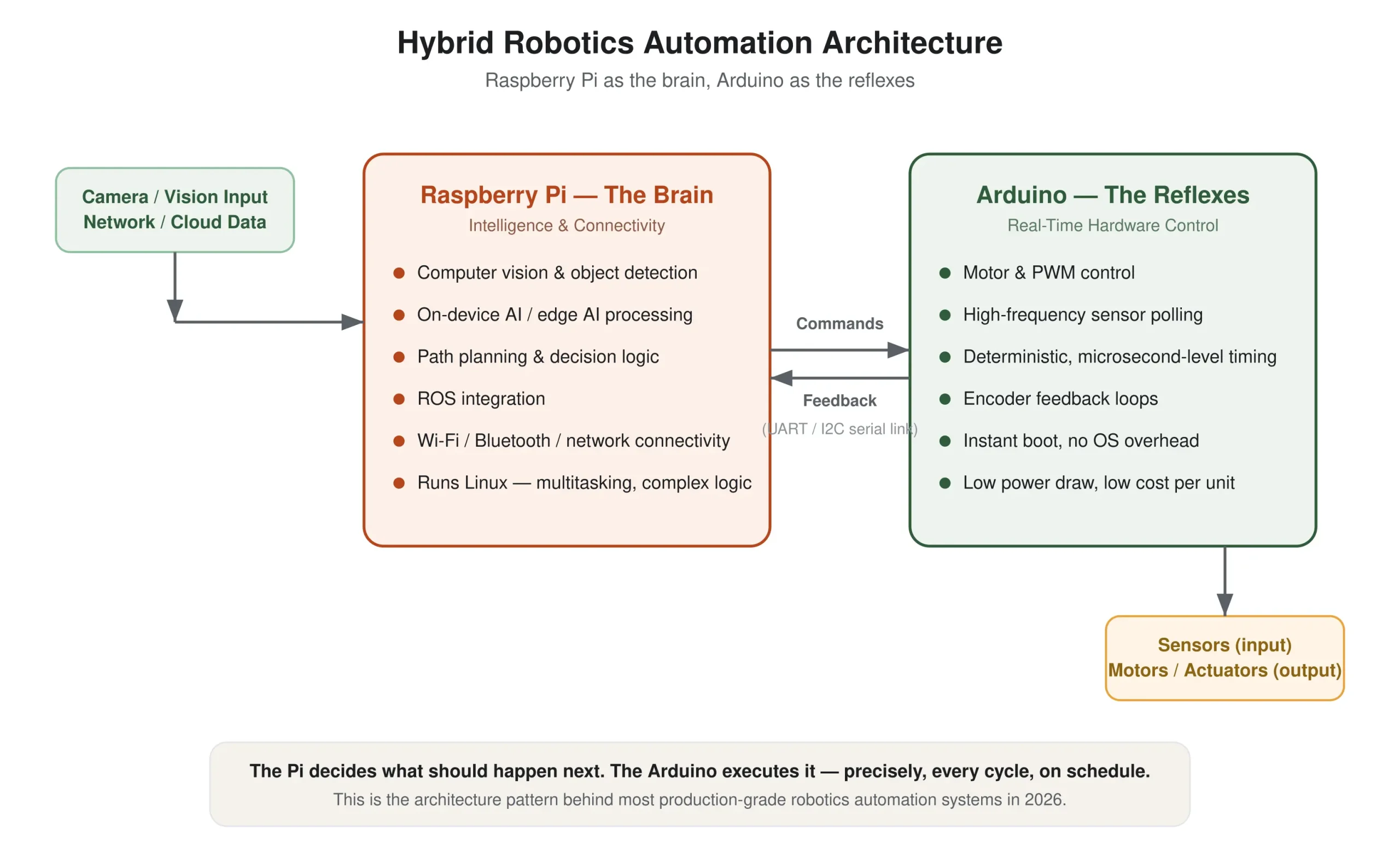
The pattern that shows up again and again in real-world robotics from classroom projects to industrial autonomous mobile robots (AMRs) is a two-board architecture: Raspberry Pi as the “brain,” Arduino as the “reflexes.”
In this setup, Raspberry Pi handles the high-level thinking: processing camera frames, planning a path, deciding what the robot should do next. It then sends simple velocity or position commands to Arduino over a serial connection (UART or I2C).
Arduino executes those commands with the real-time precision Raspberry Pi can’t guarantee closing the motor control loop, reading encoder feedback, keeping everything mechanically stable.
Neither board is “better.” In any arduino vs raspberry pi robot build, they’re solving different layers of the same problem. Treating this as a competition misses the point the real skill is in architecting how they work together, matching each component to what it’s actually good at.
How to Architect the Right Automation System for Your Business
Automation system architecture is the process of deciding how every part of a robotics system sensors, boards, communication, power, and scale works together as one reliable unit, rather than as a collection of parts that happen to be connected.
Choosing between Raspberry Pi and Arduino is only the first decision in that process, and as covered above, it’s often not even an either/or choice.
Getting the architecture right means deciding, upfront, on four things:
- Sensor selection and placement — which sensors the system needs, and where they sit, to feed accurate data to the boards without noise or blind spots
- Hardware-to-software communication — how the real-time layer (Arduino) and the intelligence layer (Raspberry Pi) talk to each other reliably, without lag or data loss
- Scalability — whether the design that works for one prototype unit still works mechanically, electrically, and in cost across 10, 100, or 1,000 deployed units
- Real-world durability — whether the system holds up to vibration, temperature swings, power fluctuation, and continuous operation, not just a clean lab demo
This is where a generic tutorial stops being useful, and where robotics automation services from an experienced partner start to matter.
Getting these four decisions right the first time rather than re-engineering a fragile prototype after it fails in the field is usually the difference between an automation project that ships and one that stalls.
If you’re evaluating a custom robotics automation build for your business, this is exactly the kind of system-level decision-making that determines whether the project succeeds.
Robotics Automation vs. Robotic Process Automation: A Quick Clarification
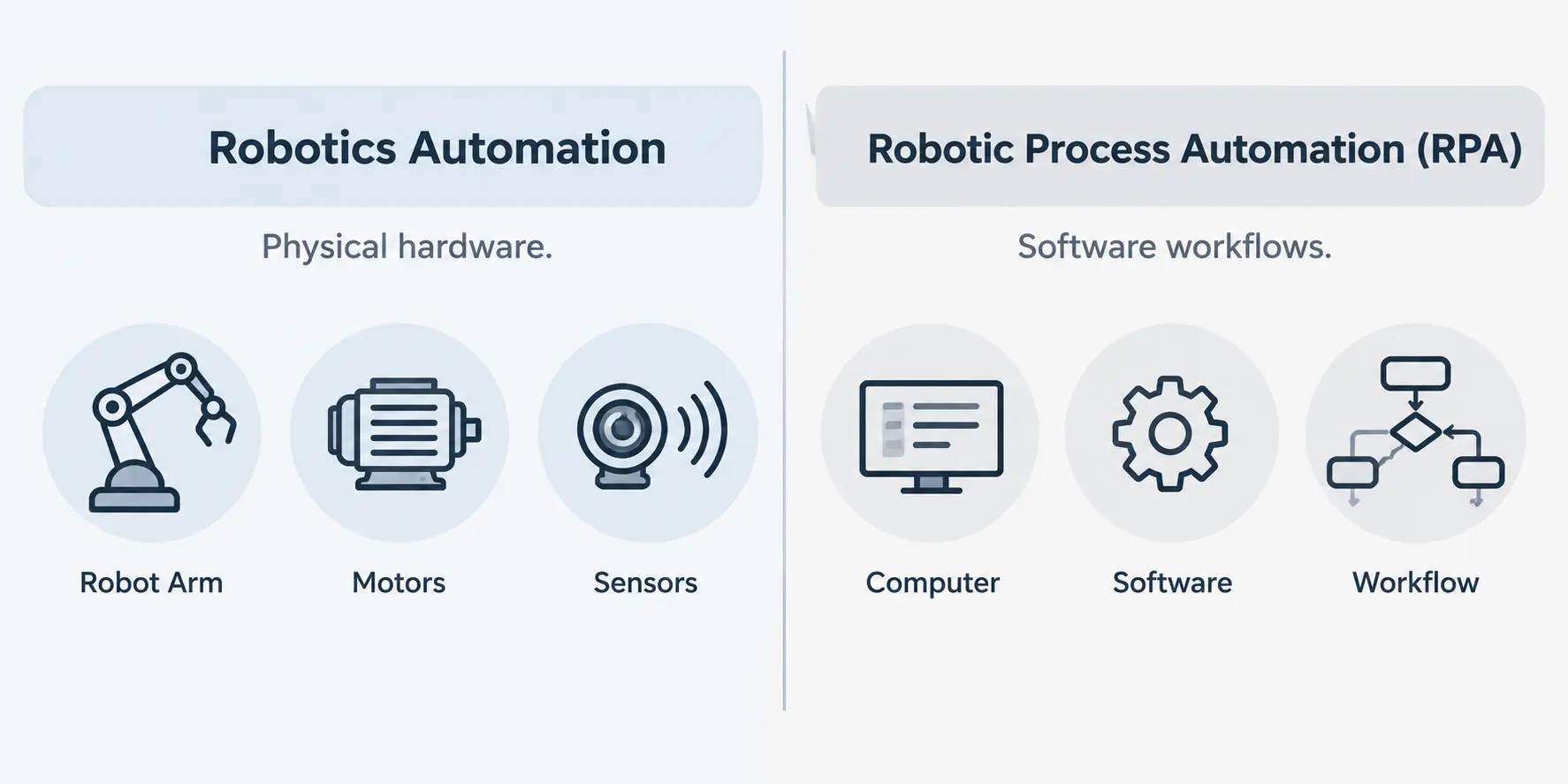
Automation and Robotic Process Automation (RPA) are two different disciplines, despite the similar name.
Robotics automation – the subject of this article involves physical hardware: Arduino, Raspberry Pi, sensors, motors, and the systems that control them in the real world.
RPA involves no hardware at all; it refers to software bots that automate digital workflows and business processes, like data entry, invoice processing, or moving information between systems.
If you arrived here searching for “robotic automation” more broadly, this distinction matters for who you need to talk to: a hardware/robotics decision needs a robotics automation team. While a software workflow problem needs a robotic process automation developer instead.
Both are valid, valuable forms of automation they just solve entirely different kinds of problems, and mixing up the two early on can send a project to the wrong team entirely.
How AleaIT’s RPA Developers Help When the Problem Is Software, Not Hardware
If what you actually need is Robotic Process Automation rather than physical robotics, AleaIT’s RPA developers handle that side of automation too and increasingly, that means pairing RPA with AI rather than relying on simple rule-based bots alone:
- Eliminating manual data entry — pulling data between systems that don’t talk to each other natively, without a person copy-pasting it.
- Connecting existing software — automating workflows across tools you already use, instead of replacing them.
- AI-powered document processing — using AI to read and understand invoices, forms, and contracts, not just move them, so the bot handles exceptions instead of stopping and waiting for a human.
- Intelligent decision automation — workflows where an AI model makes the judgment call (approve, flag, escalate) instead of a bot blindly following a fixed rule.
- Agentic automation — AI agents that can handle multi-step processes end-to-end, adapting when something doesn’t match the expected pattern, instead of breaking.
- Freeing up your team’s time — for the decisions and work that actually need a human, not repetitive tasks that don’t.
Whether your automation problem is physical robotics or an AI-powered software workflow. The starting point is the same: talk to AleaIT’s automation team about what’s eating your team’s time, and get matched to the right kind of build.
Frequently Asked Questions
Arduino is a microcontroller built for real-time hardware control — motors, sensors, precise timing.
Raspberry Pi is a full computer built for intelligence — vision, AI processing, and connectivity. Most production-grade automation systems in 2026 use both together.
Neither is universally better. Arduino wins for real-time motor and sensor control, Raspberry Pi wins for AI processing and connectivity. Most capable robots use both together.
Yes, this is the standard architecture for advanced robotics. Raspberry Pi handles planning and vision, Arduino executes real-time motor control, and the two communicate over a serial connection like UART or I2C. This is the classic arduino vs raspberry pi robot question, and in practice it usually resolves to “both, working together” rather than a single winner.
Industrial automation typically relies on Arduino-class real-time control for safety-critical timing, paired with Raspberry Pi-class computing for monitoring, data processing, and AI-driven decisions rather than choosing one exclusively.
It depends on whether your bottleneck is physical (hardware, motors, sensors) or digital (repetitive software workflows). A robotic process automation developer builds software bots for business processes; a robotics/automation partner builds physical systems like the ones described in this article.
It depends on what the system needs to do. If your project is primarily about precise mechanical control, start with Arduino. If it needs vision, AI, or connectivity, you’ll need Raspberry Pi-class processing and quite possibly both.
If you’re evaluating a robotics automation build for your business from board selection through sensor integration and deployment AleaIT’s robotics automation services team can help you architect a system built for your specific use case rather than adapted from a generic template.