Key Takeaways
- Practical AI Integration Guide – Learn how to integrate AI agents into custom web applications with a step-by-step, business-focused approach.
- Real-World AI Use Cases – Discover how AI agents improve customer support, content creation, dashboards, and workflow automation.
- Actionable Best Practices – Explore proven strategies for choosing AI models, building secure integrations, and avoiding common implementation mistakes.
- AI Development Cost Breakdown – Understand the estimated cost of chatbot, AI copilot, and enterprise AI agent development.
- Security & Compliance Insights – Learn how role-based access, audit logs, and secure deployments protect sensitive business data.
- Technology & Model Selection Tips – Compare LLM options and understand how to choose the right AI model based on your application’s needs.
- Market Statistics & Industry Trends – See the latest AI adoption data, enterprise trends, and business benefits driving AI investments.
- Scalable AI Implementation Strategy – Learn why starting with a focused use case leads to faster ROI and easier expansion.
- Expert Guidance from AleaIT – Gain insights from a team experienced in building production-ready AI solutions across SaaS, healthcare, finance, and retail.
- Free AI Consultation Opportunity – Learn how to evaluate your AI readiness and plan a roadmap tailored to your business goals.
Let’s cut straight to it.
Everyone’s talking about AI. Your competitors. Your investors. That one friend who just hooked up a chatbot on their website and now won’t stop bragging about how “it runs itself.” But if you’re building or managing a real product not just playing around, you’re probably asking a different question:
“How do I actually integrate an AI agent into my custom web application… without breaking the user experience, the budget, or the backend?” You’re not here for hype. You want clarity. Real use cases. And a path that makes sense for your users, your business model, and your tech stack. That’s what we’re here to give you.
Welcome to your no-BS, real-world guide on Integrating AI Agents into Custom Web Applications built from the trenches with AleaIT’s on-the-ground experience delivering tools that work.
Why AI Agents in Custom Web Apps Actually Matter
When most people think of AI in apps, they picture chatbots. But modern AI agents can do way more if you build with intention.
- A dashboard that knows what your sales rep wants to see based on their recent behaviour.
- A content platform that drafts headlines and descriptions tuned to your audience segments.
- A support tool that starts writing the reply before your human agent even reads the ticket.
That’s not future talk. That’s right now. We’ve built these kinds of agents.
AI agents in custom web apps aren’t gimmicks. They’re working behind the scenes in smart, context-aware ways to reduce clicks, eliminate busywork, and help your team move faster all while keeping users happy.
AI Agent vs. Chatbot vs. Copilot: What Are You Actually Building?
Before you scope a build, get the terminology straight it changes your architecture, budget, and timeline.
- Chatbot – answers questions using a script or a single LLM call. No memory of tools, no autonomous action.
- AI copilot – assists a human inside a task (drafting, summarizing, suggesting) but a person stays in the loop for every action.
- AI agent – plans, calls tools/APIs, and completes multi-step workflows with minimal human intervention, often chaining several actions together.
Most teams that ask for a “chatbot” actually need a copilot. Most teams that ask for an “AI agent” actually need to start with a copilot and graduate to full autonomy once trust is established. We cover this decision tree in more depth in our AI agent use cases guide.
What Is Manus in AI?
AI agents are moving beyond simple question-and-answer systems to handle complex tasks with greater autonomy. One well-known example is Manus, which has gained attention as an AI agent designed to execute multi-step tasks with limited human intervention.
Think you know what Manus is? Take our quick poll and test your AI knowledge.
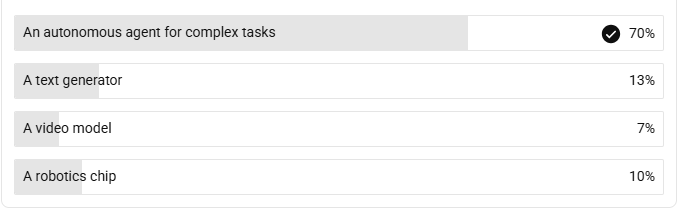
If you picked “autonomous agent for complex tasks,” that’s exactly the category we’re talking about in this guide. AI agents can plan, reason, use tools, and execute multi-step workflows to accomplish specific goals.
Want to understand how AI agents can be integrated effectively into real-world applications?
👉 Explore our guide to integrating AI agents and best practices →
Curious what it takes to build an AI agent for your own product? Talk to our AI agent team →
Why It Matters (With the Numbers to Prove It)
These aren’t just ideas they’re backed by real-world market shifts:
- The global AI software market is expected to reach $1.8 trillion by 2030.
(Statista, 2024)
- 84% of enterprises say AI provides a competitive edge, especially in automation and customer service.
(Forbes/Deloitte)
- AI in customer ops reduces support volume by 25–35%.
- 73% of users expect AI-driven experiences only 26% say they’ve seen it done right.
Are AI Agents the next big tech revolution?
AI agents are becoming increasingly capable of handling multi-step tasks, using tools and supporting business workflows. But how transformative do people actually think this technology will be? Take this quick poll and share your perspective on the future of AI agents.

With 60% of respondents calling AI agents overhyped. Meanwhile, 20% believe they are definitely the next big tech revolution, while 10% think their major impact may come in a few years and another 10% remain unsure.
The results highlight a cautious audience perspective around AI agents. While the technology is gaining attention for its ability to perform increasingly autonomous tasks, these responses suggest that many readers are still waiting to see consistent, practical business outcomes before viewing AI agents as a major technological shift.
Best Practices for Integrating AI Agents (Without Making a Mess)
Let’s be honest, most AI integrations go sideways because people chase buzzwords instead of solving real problems. Here’s how we avoid that trap:
1. Start Small. Solve One Pain Point.
Don’t start by trying to build the next Jarvis or Clippy 2.0. Start with one annoying, repetitive task your users do all the time.
“One of our clients was spending 3 to 4 hours per week manually tagging user submissions. We plugged in an AI agent to classify them based on tone, topic, and urgency. That time savings paid off in the first month.”
Build momentum through small, valuable wins.
2. Pick the Right Model and Be Strategic
OpenAI’s GPT-4? Claude? Mistral? Open source? There’s no “one model to rule them all.”
We help you decide based on:
- Context length needed
- Sensitivity of the data
- API costs
- Latency and volume constraints
The goal isn’t to flex the fanciest model. It’s to pick the right tool for the job.
3. Connect Through Standards, Not Custom Glue Code (MCP)”
In 2025 most integrations were custom API glue brittle, one-off, expensive to maintain. By 2026, Model Context Protocol (MCP) has become the standard way to connect an AI agent to your CRM, ERP, ticketing system, and internal databases without hand-rolling a new connector for every tool.
Why this matters for your build:
- One integration layer instead of N one-off integrations
- Easier to swap the underlying LLM later without re-wiring every tool connection
- Cleaner audit trail of exactly which tool the agent called and why
If your team is evaluating AI agent development partners, ask specifically whether they build on MCP or on custom per-integration code — it’s a good filter for future-proofing.
4. Always Build for Failure (Because AI Will Mess Up)
AI’s powerful but imperfect. You need guardrails.
Smart AI agents are paired with:
- Confidence scoring
- User overrides
- Human fallback logic
- Transparent logging, queryable audit logs
- AI agent monitoring and observability, tracking latency, cost per task, and failure rate in production, not just at demo time
Trust isn’t built on flashy demos. It’s built on predictable behaviour especially when things go sideways.
5. Real Integration > Fancy UI
If your agent can’t securely access your data and business logic, it’s just guessing. Period.
We prioritize:
- CRM systems (Salesforce, HubSpot) for customer history and logging interactions
- ERP systems for inventory, order status, and finance workflows
- Help desk platforms for ticket triage and routing
- Databases and data warehouses for direct, real-time queries
- Knowledge bases, often paired with retrieval-augmented generation (RAG) so answers stay grounded in your actual documentation
That’s custom web application AI integration done right not a surface-level bandaid.
6. Make the Experience Feel Seamless (Not “AI-ish”)
When users notice the AI, it’s often because it got in their way.
The best AI agents? Invisible.
They just quietly assist. Predict what you need. Remove friction. And stay out of the spotlight.
“That was fast. How’d it does that?”
Exactly.
Which LLM Should Power Your Agent?”
| Model | Best for | Watch out for |
| GPT-4 / GPT-4o (OpenAI) | General-purpose agents, broad tool ecosystem | Cost at scale, data residency for regulated industries |
| Claude (Anthropic) | Long-context tasks, careful reasoning, enterprise compliance needs | Slightly higher latency on very short tasks |
| Mistral / open-source | Cost-sensitive, self-hosted, data-sovereignty-critical use cases | More engineering effort to reach parity performance |
We help clients match the model to the constraint that matters most context length, data sensitivity, API cost, or latency instead of defaulting to whichever model is trending. Our Large Language Model development team can walk you through trade-offs for your specific stack.
What Does It Cost to Build an AI Agent into a Web App?
Alright, real talk: what’s this going to run you?
Here’s a range based on what we’ve built at AleaIT:
|
Type of Integration |
Estimated Cost |
| Basic AI chatbot (pre-trained model) | $2,000–$5,000 |
| Mid-level AI agent (custom logic, data access) | $8,000–$25,000 |
| Full-stack enterprise AI agent | $30,000+ |
Why AleaIT Solutions?
You could try doing this alone, but most teams burn out or build something brittle.
We’re different.
We help you:
- Stitch together messy data securely
- Make AI invisible but powerful
- Build systems that evolve, not break
Whether you’re in SaaS, healthcare, finance, or retail we’ve seen the edge cases, and we design for them.
AI Agent Security & Governance: What ‘Secure’ Actually Means
“Role-based access” gets thrown around a lot. Here’s what we actually build into every production agent:
- Non-human identity management – every agent gets its own scoped, auditable identity, not a shared service account
- Least-privilege access – the agent can only touch the systems and data it needs for its specific task, nothing more
- Credential rotation – API keys and tokens tied to agents are rotated automatically, not hardcoded
- Full audit trails – every action the agent takes is logged and traceable back to the triggering request
- Compliance alignment – HIPAA, GDPR, and SOC 2 considerations baked in from day one for regulated industries like healthcare and finance
This matters more than it sounds most AI agent failures in the news aren’t model failures, they’re governance failures: an agent with too much access, doing something nobody was watching for. If you’re building in a regulated space, see how we approach this for AI agents in healthcare.
Let’s Talk (No Salesy Nonsense)
If you’ve read this far, you’re probably thinking:
“Yeah… we should probably figure this AI thing out.”
Let’s do it together. No pressure, no slide decks just real talk.
Book a free 20-minute consult with AleaIT
We’ll Walk you through a live AI agent setup
🛠 Provide templates, test logic, and discuss edge cases
Also want to budget for:
- LLM API usage (token costs scale with traffic)
- Infrastructure + deployment
- Prompt tuning + iteration post-launch
At AleaIT, we scope AI projects based on real outcomes, not buzzwords. Explore our Artificial Intelligence solutions designed to deliver 10x ROI without bloated costs or complexity.
Frequently Asked Questions
Start by identifying the business problem you want AI to solve. Then evaluate your existing application, APIs, and data to determine the best AI integration approach.
The right AI model depends on your use case, accuracy, speed, security, and budget—not popularity. Learn more about our Large Language Model (LLM) development approach.
AleaIT builds secure, scalable AI solutions tailored to your business and integrates them seamlessly into existing systems. See our case studies to explore real-world results.
The cost depends on the AI agent’s complexity, integrations, and customization requirements. A discovery session provides the most accurate estimate.
Simple AI chatbots can be deployed in 1–2 weeks, while most custom AI agents take 4–8 weeks. Enterprise-grade implementations typically require 3+ months.
Yes. With proper security measures like role-based access, encryption, audit logs, and private deployments, your data remains protected and compliant.
It depends on your goals. Chatbots answer questions, copilots assist users during tasks, and AI agents automate complete workflows across systems.
Yes. AI agents need regular monitoring, prompt updates, performance tuning, and cost optimization to maintain accuracy as your business evolves.
Model Context Protocol (MCP) is becoming the standard way AI agents connect to tools like your CRM, ERP, or internal databases.
Through non-human identity management, least-privilege access controls, automatic credential rotation, and full audit logging the same governance discipline you’d apply to a human employee with system access, adapted for a machine actor.